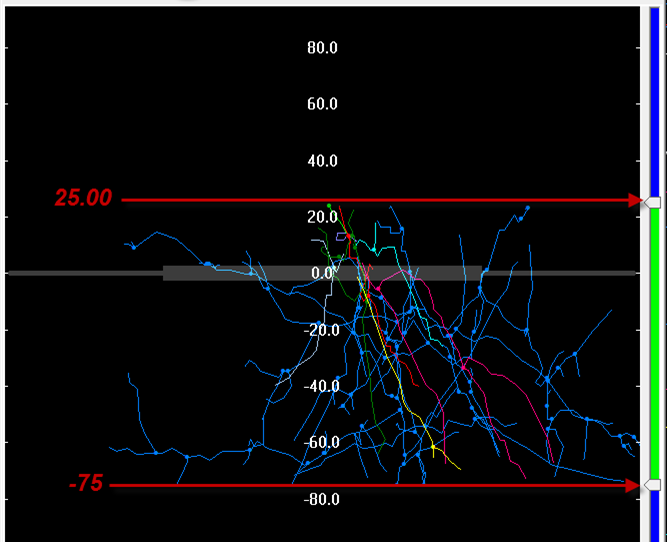
Orthogonal view
Purpose

|
Use the orthogonal view to view tracing/image data from the side, along the XZ axes or the YZ axes. It is also useful for quickly moving the displayed portion of tracing/image data. |
See also Image Slice display options in the 3D window.
Using orthogonal view
 Click Ortho View on the
 The Orthogonal View window also opens when you go to Registration > Tools drop-down > Depth filter.
The Z position is displayed in the title bar of the Orthogonal View window. You may need to drag the window wider to see it. 
To navigate quickly to a specific Z location, do one of the following:
-
Click on the Z position in the Orthogonal View window.
-
Right-click on the Z location in the Orthogonal View window, then click Go here.
Button functions in the Orthogonal View window

|
Zoom in | Zoom out | Zoom to fit. |

|
Click on a point you want to see in the center of the Orthogonal View window. |

|
Click to view along the XZ or YZ axis. |

|
Depth filters (symmetric and asymmetric) can be used to limit the display of traced data and/or markers to those at a specified Z position range.
The selected range is highlighted in green on the right of the Orthogonal View window. Type a number into the range box or use the sliders to define the range of Z-positions allowed. Traced data and/or markers that were placed within the range are displayed and those outside the range are not displayed.
Click
It displays traced data and/or markers within the range highlighted in green on the right. You can adjust the filter range by entering upper and lower Z positions in the boxes or dragging the arrows on the right of the Orthogonal View window.
|
 Symmetric depth filter
 Click to engage a depth filter that is centered on the current Z position.
 , then click
  to engage the asymmetric depth filter.
  This version of the depth filter does not remain centered on the current Z-position.