Pixel window
Purpose
|
View the luminance, or red channel, green channel or blue channel values for individual pixels in the displayed image. |
The Pixel window tool may be useful to address issues with image segmentation (Kodalith): The Pixel window can help determine how the luminance values vary across the image and provide insights into adjusting the illumination source for better, more uniform illumination.
Procedure
-
Go to Image > Luminance and click Pixel window.
-
The Pixel Luminance panel opens.
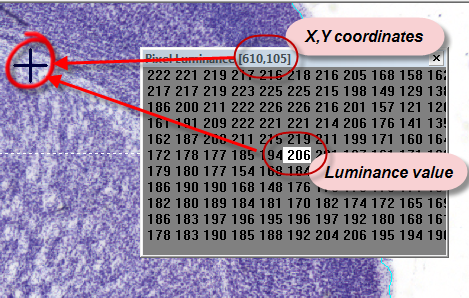
Luminance values for each pixel in the main NeuroInfo window are displayed in a table (see image below; click the thumbnail to view the image full size).
Right click anywhere in the panel for more options.
Luminance
For the pixel located directly under the crosshair cursor:
- The luminance value is displayed at the center of the Pixel window, highlighted in white.
- The XY coordinates of the pixel are displayed in the title bar of the window.
For a gray scale image, the luminance value range is the same as the gray scale value (from 0 to 255).
- A black pixel has a luminance of 0.
- A white pixel has a luminance of 255.
The size of the crosshair has no effect on the sampling of the image. As the cursor is moved to the edge of the image the values off the edge of the image are seen in the pixel window as dashes instead of numbers.
Viewing a luminance average
- Move the cursor over the Pixel window.
- Right-click and select Circular Crosshair Average.
- Use the mouse wheel or +/- keys to modify the size of the circular cursor. The program highlights all the values of pixels within the circular cursor area.
The title bar of the Pixel window indicates the average luminance, the number of pixels averaged, the XY coordinates of the pixel located at the center of the circular area.
Red, Green, Blue channel values
You can view the red, green, or blue channel values for individual pixels in a true color or paletted image. The red, green, or blue pixel values are raw values—they are not multiplied by the values used in computing the luminance.
 Viewing the channel values
- Move the cursor over the Pixel window.
- Right-click and select Red Channel/Green Channel/Blue Channel.