Anastomoses
Vessel reconstruction and analysis is available with the Neurolucida 360 Ultra package only. Click here for more information.
Purpose

|
The Anastomoses analysis report provides metrics for anastomoses which are loops constituted by segments with a diameter equal or smaller than a specified maximum diameter. A loop is defined as a series of line segments that start and end at the same node, without repeating a node or segment that is already in its path. |
Procedure
-
Select the modeled structures you want to include in the analysis.
-
 Go to the Analyze ribbon and click Anastomoses.
You can also find Anastomoses in Network analysis in the Vessel Data section of the Analyze ribbon.
-
In the Anastomoses analyses window that opens, enter the criteria that you want to use for the analyses and check/uncheck the box to include Individual loops analysis or not.
-
Click OK to run the analyses.
Analysis results
The Anastomoses report provides metrics for loops constituted by segments with a diameter equal or smaller than a specified maximum diameter.
Click a loop data in the report to highlight the loop in the tracing. 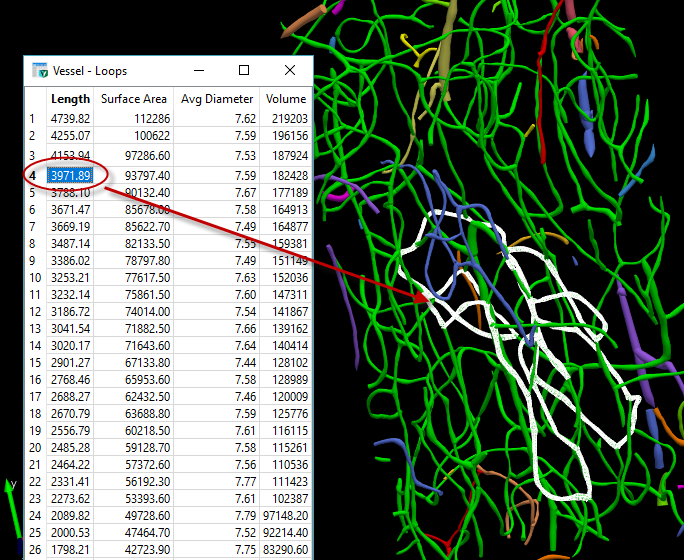
Length: Total length of the line segments used to trace one loop.
Surface area/Volume: Computed by modeling the pieces of the segments as frusta (i.e., truncated right circular cones).
Average diameter: Length-weighted mean. The loop is modeled as a series of frusta. The length of each frustum is used in the calculations to provide a correct average diameter over the length of the loop as it tapers.