Wedge analysis
Purpose
Wedge analysis is used to analyze whether there is differential growth or retraction of dendritic processes in particular locations in virtual/anatomical regions by examining the distribution of dendritic length relative to a fixed point and direction. It is similar to the Polar Histogram, although the Wedge analysis determines direction relative to a single point, while the Polar Histogram determines direction locally.
How it works
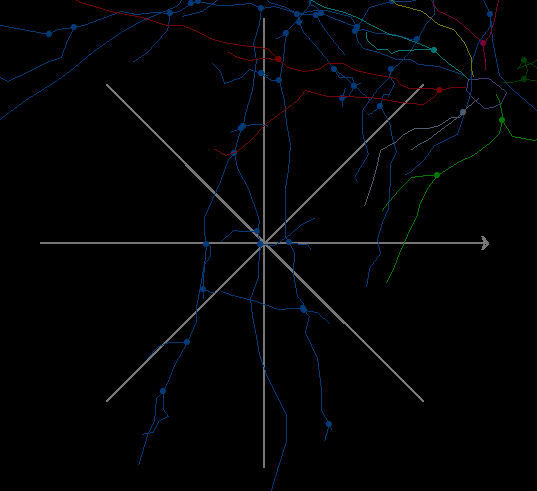
A coordinate system is created at the point with the 0 angle defined by a ray that originates at the point. The plane is divided into a number of equiangular wedges. The length in each wedge is the sum of the lengths that fall within the wedge. Projection causes foreshortening of the tracing because the Z information is lost in projection but length calculations still take the Z information into account. The total length in all wedges is the same as the total length of all dendritic processes used in the analysis.
Procedure
- Prepare your data file in Neurolucida or Neurolucida 360.
- Open your data file in Neurolucida or Neurolucida 360.
-
Open a wedge sample file:
- Click Open Data File from the File menu.
- Check Merge at the bottom of the window
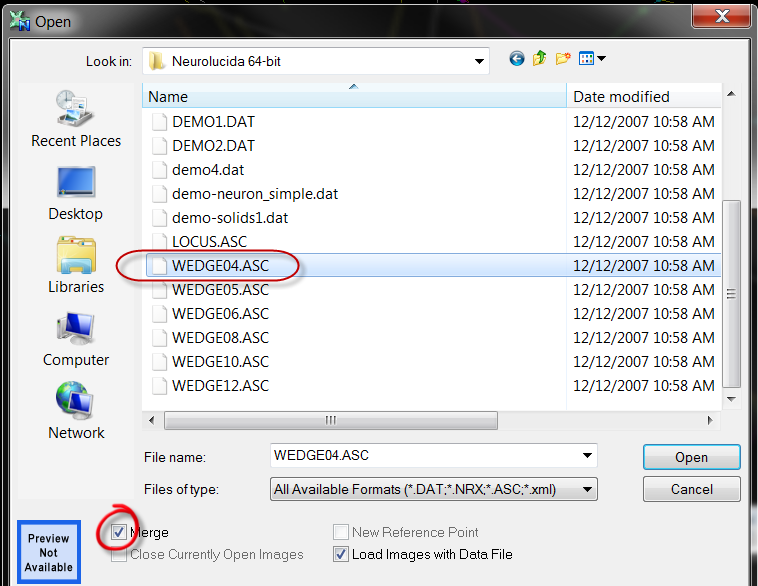 .
. - Select one of the sample wedge files (e.g., WEDGE08.ASC) from the Neurolucida or Neurolucida 360 directory. The number in the file name refers to the number of wedges (e.g., 8 wedges for WEDGE08) or 8 spokes in 2D.
- Click OK. The wedge tool is displayed over the tracing
 .
.
Move the wedge tool to an appropriate location:
- Switch to Edit mode.
- Click the wedge tool to select it.
- Right-click away from the wedge tool and select Move Selected Contour.
- Drag the center of the wedge tool to change its location.
- Change the direction of the wedge tool:
- Switch to Edit mode.
- Click the wedge tool to select it.
- Right-click away from the wedge tool and select Rotate Selected Contour.
- Drag the tip of the arrow.
- Save and close the data file.
- Open your data file in Neurolucida Explorer.
-
 Select Wedge Analysis from the Spatial dropdown menu on the Analyze ribbon to open the Wedge Analysis window.
Reference
Nogueira-Campos, A. A., Finamore, D. M., Imbiriba, L. A., Houzel, J. C., & Franca, J. G. (2012). Distribution and morphology of nitrergic neurons across functional domains of the rat primary somatosensory cortex. Frontiers in Neural Circuits, 6, 57. http://doi.org/10.3389/fncir.2012.00057
Goldstein, L.A., Kurz, E.M., Kalkbrenner, A., Sengelaub, D.R. (1993). Changes in dendritic morphology of rat spinal motoneurons during development and after unilateral target deletion. Developmental Brain Research, 73:151-163.
In this article, wedges are referred to as "sectors" but the conceptual basis is the same.