Locus
Purpose
|
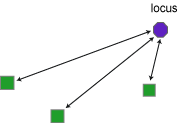
Locus measures the straight-line distance from a preset locus to all of the other markers in the file. A single locus or multiple loci can be used. Loci are designated in Neurolucida, Neurolucida 360, or Vesselucida 360. |
Procedure
To designate a locus
- Open the file in Neurolucida, Neurolucida 360, or Vesselucida 360 and place a marker at the desired locus site.
- Click Select Objects on the Trace ribbon, then click the marker to select it.
- Right-click and select Mark as Locus.
To remove a marker as a locus
- Click Select Objects on the Trace ribbon, then click the marker to select it.
- Right-click and select Remove Locus Status.